
New · Our own app
Fly your DJI drone from anywhere.
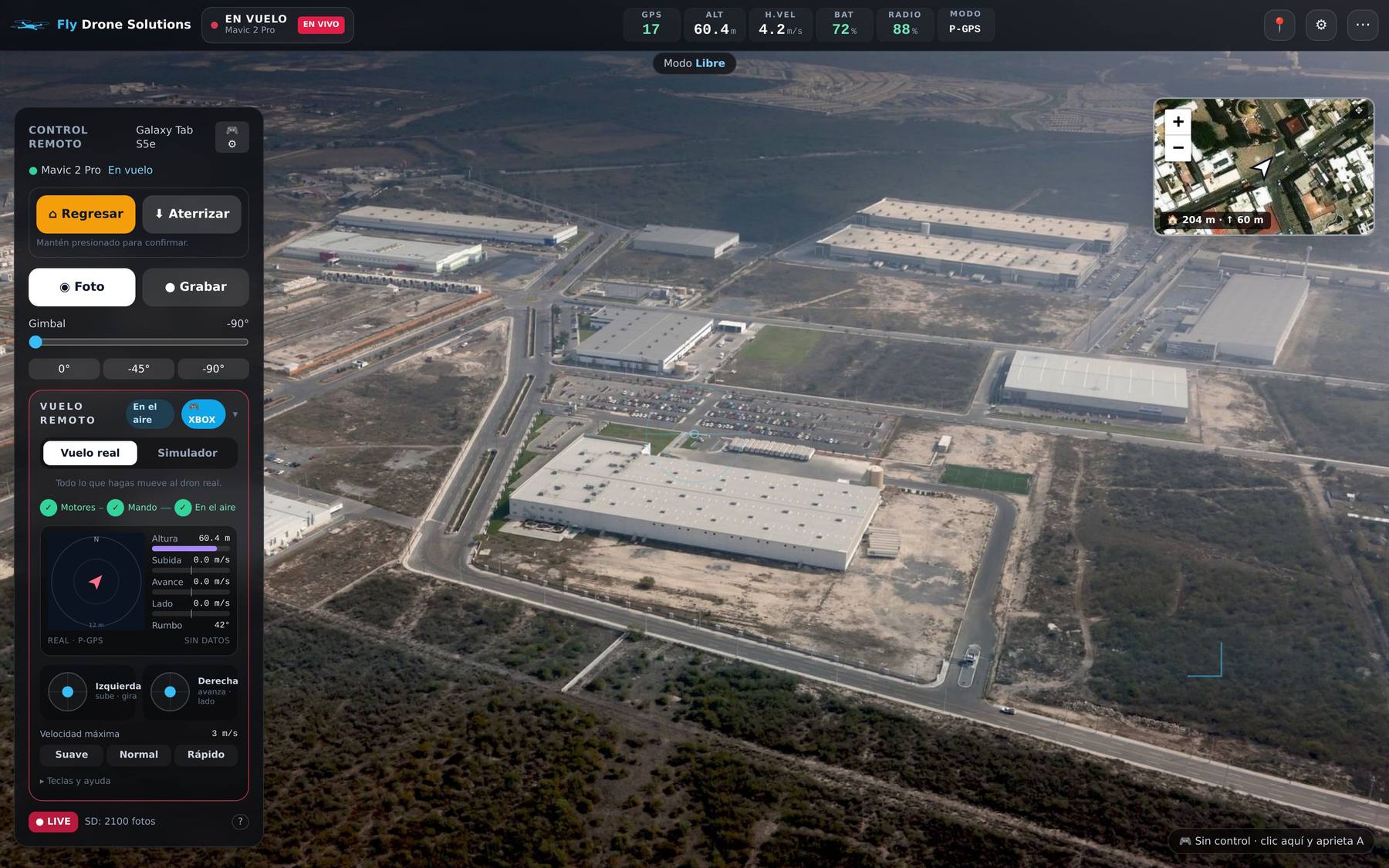
Fly Drone Solutions is our Android app and web console for DJI drones: it flies automatic mapping missions and lets a pilot fly the drone remotely from the browser, with live video. Every flight is logged and the photos go straight to GeoVolumetrics.
01 · Map
You plan the mission, the app flies it.
The app runs on an Android tablet connected to the DJI controller. Plan from your computer or the tablet, and the drone takes off, flies the lines and comes back on its own.
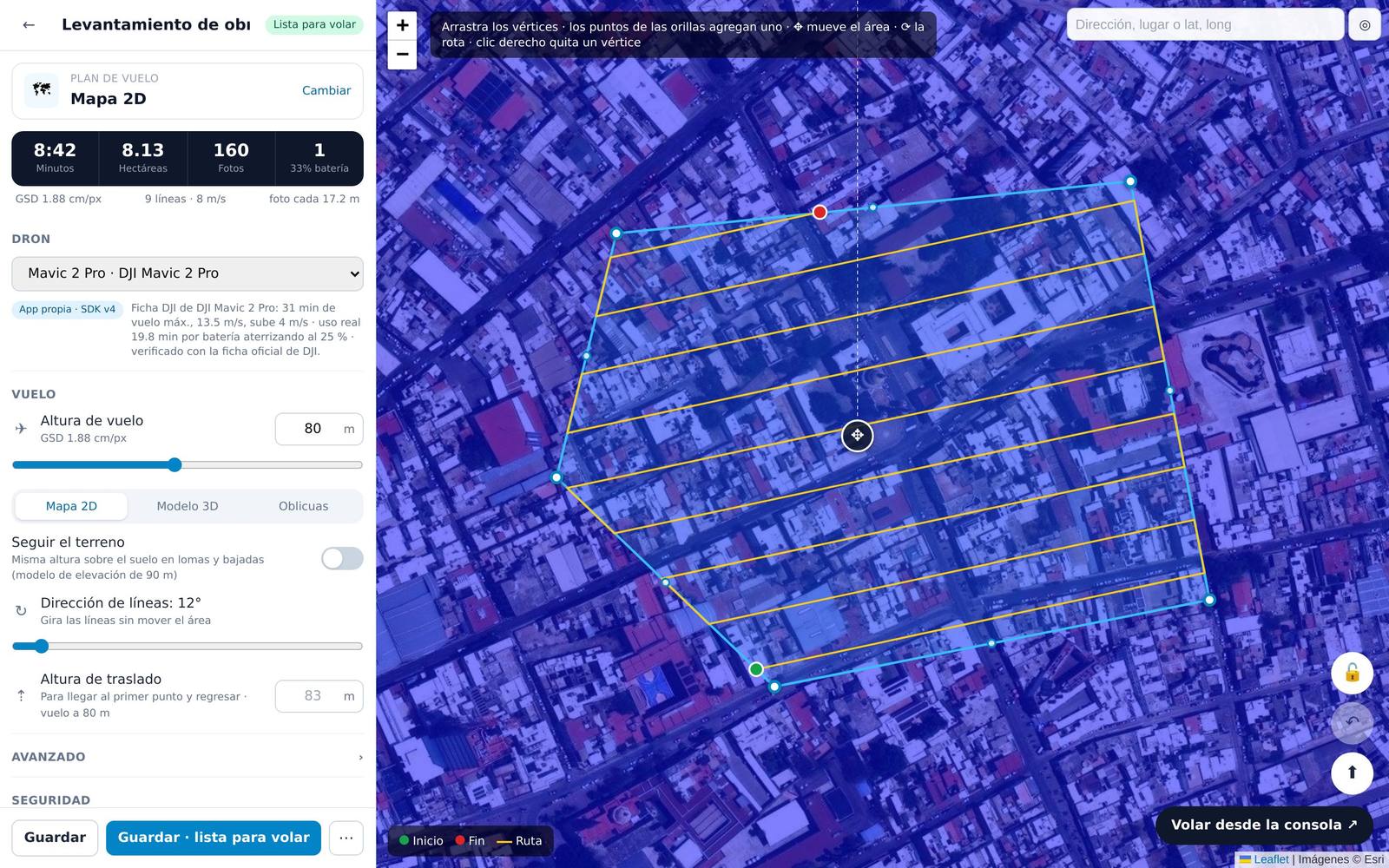
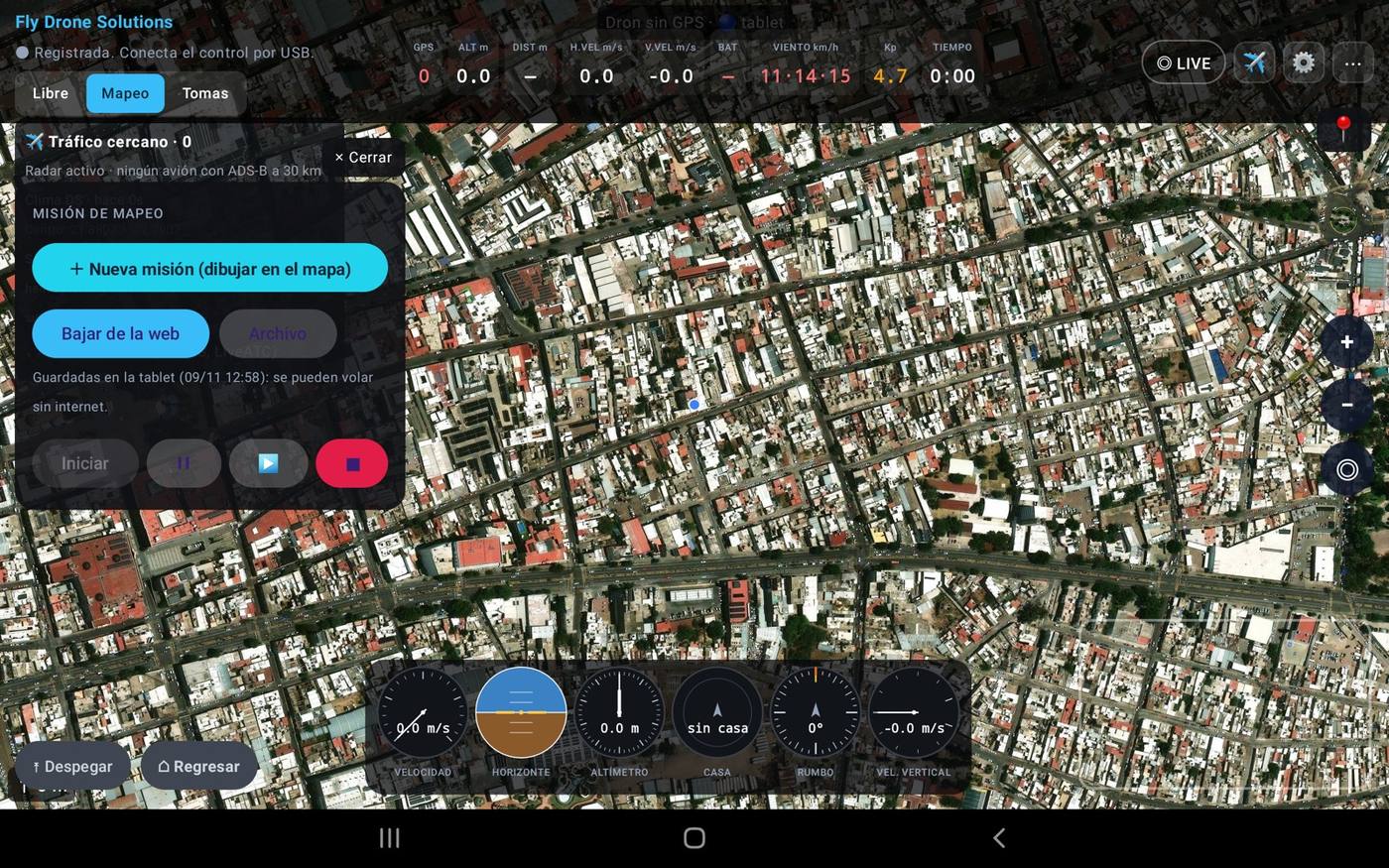
Draw the area on the map and the app works out lines, photos, time and batteries.
2D map, double grid, 3D obliques, facades, corridors, orbits and waypoints.
Terrain follow: altitude adjusts to the terrain so everything comes out at the same resolution.
After landing, the photos go to GeoVolumetrics for orthomosaic, contours and volumes.
02 · Remote flight
Your pilot in the office, your drone on site.
From the web console a pilot in the office flies the drone on site. On site you only need one person with the DJI controller, who can pause the drone or take back control at any time.
01
Live video
H.264 over WebRTC; it only connects while the drone is on.
02
Xbox controller or keyboard
Sticks, gimbal, photo and video from the browser.
03
Map and telemetry
Altitude, speed, battery, satellites and position in real time.
04
Safe by design
If the signal drops it brakes within 0.5 s and the on-site controller takes over. At 25% battery it returns home by itself.
What DJI apps don't have
Everything on one screen, on any drone.
One app for all your DJI drones
Instead of DJI GO 4, DJI Fly or DJI Pilot 2 depending on the model.
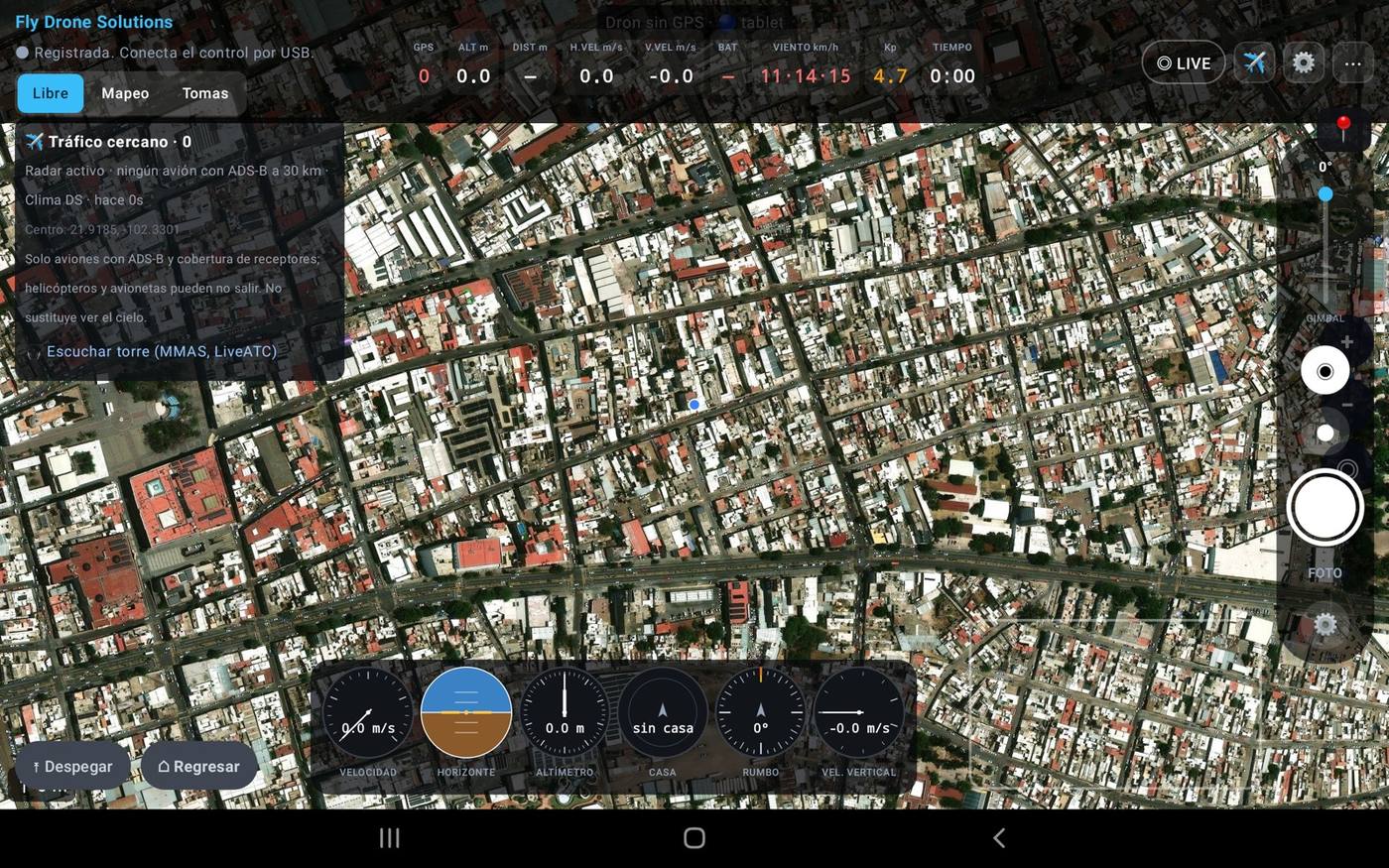
ADS-B aircraft radar
Nearby traffic on the map with track, route and alerts, even if your drone has no AirSense.
Listen to the tower
One button plays the control tower of the nearest airport.
Wind by altitude and METAR
Wind at 10, 80 and 120 m, plus the airport METAR.
Kp index and satellites
Solar storms that affect GPS and compass, before takeoff.
Six-pack instruments
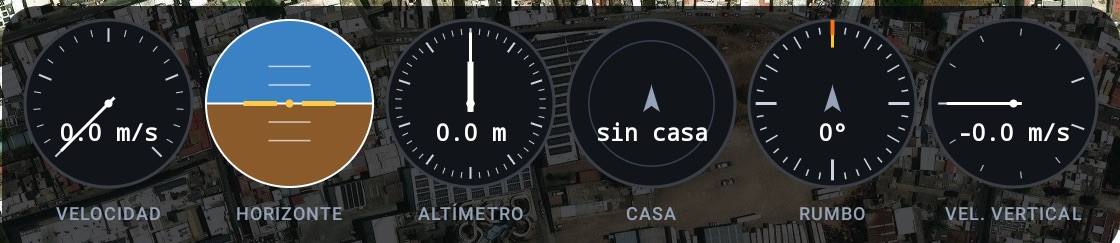
Airspeed, attitude, altimeter, home, heading and vertical speed, like a cockpit.
Automatic flight log
Every flight is logged automatically: route, duration, batteries and GPS.
The app on the tablet
What the pilot sees.
Real screenshots of Fly on a Galaxy Tab connected to the DJI controller: telemetry, weather, air traffic and instruments.
How it works
From takeoff to data, without the hassle.
01
Install the app
On an Android tablet connected to the DJI controller. It updates itself.
02
Switch on the drone
It shows up on your dashboard with battery, satellites and location.
03
Map or fly
Launch an automatic mission or take control from the console.
04
Everything is logged
Every flight goes into the log and the photos go to GeoVolumetrics.
Drones
With the DJI drones you already own.
Tested on our fleet
- Mavic 2 Pro
- Mavic 2 Zoom
- Phantom 4 Pro
- Phantom 4 Advanced
- P4 Multispectral
- Matrice 210 RTK
- Mini 4 Pro
Compatible (more than 35 models)
- Mini 3 / 3 Pro
- Air 2S
- Mavic 2 Enterprise
- Mavic 3 Enterprise
- Mavic 3 Thermal
- Mavic 3 Multispectral
- Phantom 4 RTK
- Inspire 2
- Matrice 30 / 30T
- Matrice 300 RTK
- Matrice 350 RTK
- Matrice 4E / 4T
Questions about Fly.
Have another question? Email us at info@dronesolutions.com.mx.
What is Fly Drone Solutions?
+
An Android app and web console for DJI drones, made by Drone Solutions in Aguascalientes, Mexico. It flies automatic mapping missions and lets a pilot fly the drone remotely from the browser, with live video.
Can you fly a DJI drone remotely from a computer?
+
Yes. With Fly, a pilot in the office opens the console at fly.dronesolutions.com.mx and flies the drone with an Xbox controller or keyboard, with live video, map and telemetry. On site you only need one person with the DJI controller, who can take back control at any time.
Which DJI drones are compatible?
+
Tested: Mavic 2 Pro and Zoom, Phantom 4 Pro and Advanced, P4 Multispectral, Matrice 210 RTK and Mini 4 Pro. Compatible: more than 35 models with DJI's Mobile SDK, such as Mavic 3 Enterprise, Matrice 30, 300 and 350 RTK and Matrice 4E/4T. Flip, Neo, Avata 2 and Mini 5 Pro are not supported yet because DJI publishes no SDK, and screen controllers (DJI RC, RC 2) don't allow third-party apps.
What do I need to use Fly?
+
A compatible DJI drone, its controller, an Android tablet and internet on site (4G or wifi). In the office, just a browser; the Xbox controller is optional.
How much does Fly cost?
+
There is pay-per-flight and monthly plans. Prices and details are at fly.dronesolutions.com.mx. Map processing is billed separately by GeoVolumetrics.
What happens if the signal drops?
+
The drone brakes within half a second and control goes back to the on-site controller. At 25% battery it returns to the takeoff point by itself.
Want to see Fly flying on your site?
We'll give you a demo with your drone or ours.